Handling Scan results
After the scan is finished, you'll need to look at each possible match and decide how to handle it.
Warning! If you are using Thunderbird or Eudora, do not shred/delete mail messages from within Identity Finder. Shredding mail messages in Thunderbird or Eudora will shred your entire mailbox. It is recommended that you Scrub Eudora messages. Please contact systems@math.cornell.edu if you have questions/concerns. (It is safe to shred messages if you are using Outlook.)
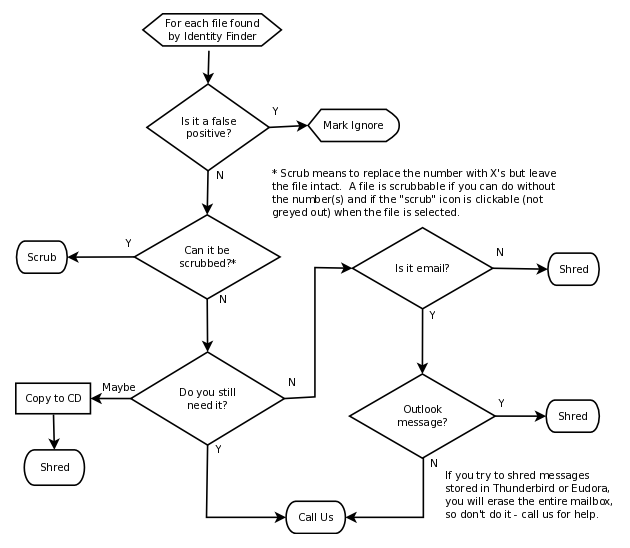
You need to decide what to do for each file that contains suspected confidential data. Your options are:
| Is it Confidential Data? |
Action | Details | Step-by-Step |
| No | Ignore | The match was a false positive. Files you ignore with the Ignore tool are skipped in future scans (as long as the file remains unchanged). | How to Ignore Files |
| Yes | Remove | You are sure you no longer need the file. Use the Shred tool to securely delete files. Not to be used on Thunderbird or Eudora messages. |
How To Shred Files |
| Manually remove confidential data by opening the file with an appropriate program. This is the only way to handle Thunderbird or Eudora messages by yourself; open the program, find the message, put it in your trash, empty your mail program's trash. If you have a large quantity of messages with confidential data or have difficulty handling it yourself, please contact us for help. | |||
| Keep | Scrub/redact the confidential data in the file. The Scrub tool creates a new file with the confidential data masked. The original file is shredded. | How to Scrub Files (Redact) | |
| Move the file to a secure storage location preferably a CD, DVD or other offline storage. If you have multiple files to burn to a CD/DVD, the Quarantine too can help by shredding the original file and placing a copy in a folder of your choice. | How to Quarantine Files | ||
Note: The Math Department will NOT be using the Secure or Recycle options.
Flow chart for decision making